Defining Cloud-Based Business Software Solutions and Architecture

By July 2026, these solutions are no longer just an option; they are a strategic necessity. They offer flexibility, reliability, and availability that traditional systems often cannot match.
In this extensive guide, we will explore everything you need to know about cloud-based business software. We will define what these solutions are and how they differ from older, on-premise systems. We will also dive into the primary benefits for businesses of all sizes, and address common challenges like security and vendor lock-in. Furthermore, we will examine popular software types, discuss data handling and compliance, and provide guidance on choosing the right provider. We will also clarify the distinctions between cloud services, web services, and hosted solutions, and highlight the transformative role of AI and automation in these platforms.
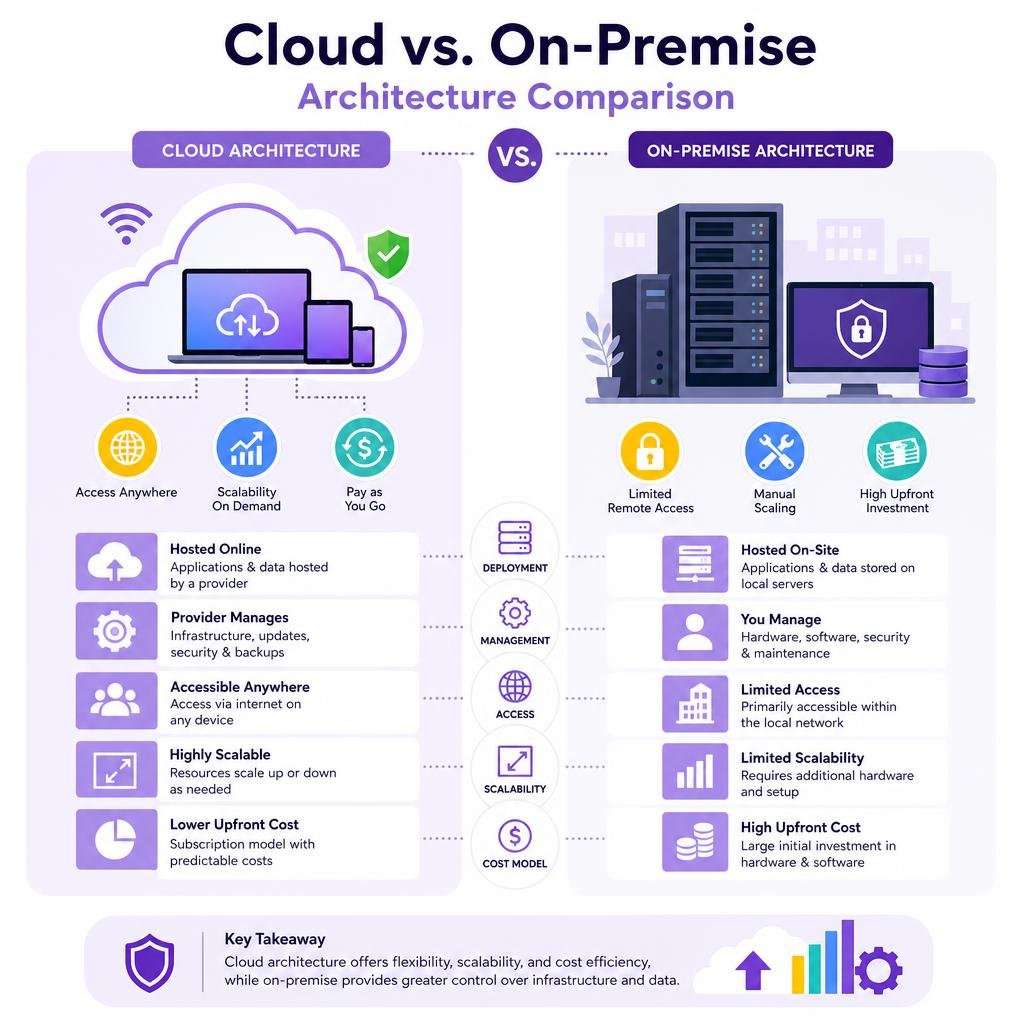
Cloud-based business software solutions represent a fundamental shift in how organizations acquire, deploy, and manage their technological infrastructure and applications. At its core, a cloud-based solution is an IT resource—whether it’s an application, platform, or infrastructure—that a cloud computing provider offers on-demand, delivered over the internet. Instead of installing and maintaining software and hardware on local servers, businesses access these resources through a web browser, with the provider managing the underlying infrastructure, updates, and maintenance.
This model contrasts sharply with traditional on-premise software, where businesses purchase licenses, install applications on their own servers, and bear full responsibility for hardware, software, security, and maintenance. The cloud paradigm offloads much of this burden to specialized providers, allowing businesses to focus on their core competencies.
Cloud services are typically categorized into three main models:
- Software as a Service (SaaS): This is the most common form of cloud-based business software. Here, the provider hosts the application and makes it available to users over the internet. Users typically pay a subscription fee and access the software via a web browser or mobile app. Examples include customer relationship management (CRM) systems, enterprise resource planning (ERP) platforms, and accounting software. We rely on many SaaS applications daily, from email services to collaboration tools.
- Platform as a Service (PaaS): PaaS provides a platform for developers to build, run, and manage applications without the complexity of building and maintaining the infrastructure typically associated with developing and launching an app. It offers the necessary hardware and software tools over the internet.
- Infrastructure as a Service (IaaS): IaaS gives businesses virtualized computing resources over the internet. This includes virtual machines, networks, storage, and operating systems. Users manage the operating system, applications, and data, while the provider manages the physical infrastructure. This offers the highest level of flexibility for IT departments.
Many organizations leverage a combination of these models to create a robust and flexible IT environment. For instance, a growing business might utilize a comprehensive cloud-based business management platform for its core operations, while also using PaaS for custom application development and IaaS for scalable data storage.
Distinguishing Cloud Services from Web Services and Hosted Solutions
While often used interchangeably, “cloud services,” “web services,” and “hosted solutions” refer to distinct concepts in the digital landscape. Understanding these differences is crucial for making informed technology decisions.
Cloud Services encompass the broad spectrum of IT resources delivered over the internet, as described above (SaaS, PaaS, IaaS). They are characterized by elasticity, self-service provisioning, and a pay-as-you-go model. The provider manages the underlying infrastructure, ensuring uptime, scalability, and security.
Web Services, on the other hand, are more specific. A web service is essentially an Application Programming Interface (API) that allows different applications to communicate and exchange data over the internet. It’s a standardized way for applications to interact, often forming the backbone of how cloud services integrate with other systems. For example, a cloud-based CRM might use web services to pull customer data from an accounting system or push sales orders to an inventory management system. Web services are about data exchange and interoperability, whereas cloud services are about delivering entire applications or infrastructure.
Hosted Solutions refer to a scenario where a third-party provider hosts and manages a business’s applications or data on their servers. This can be a dedicated server, a virtual private server, or even colocation (where a business owns the hardware but houses it in a third-party data center). The key distinction from cloud services is often the level of flexibility and scalability. Traditional hosted solutions typically involve fixed resources and a less dynamic infrastructure. While they offer some benefits over purely on-premise systems, such as reduced hardware maintenance, they often lack the instant scalability, elasticity, and pay-per-use model inherent in true cloud computing. Vertical scaling, for instance, might require manual intervention and downtime in a hosted environment, whereas cloud services can often scale resources up or down automatically and instantaneously.
Here’s a brief comparison:
Feature Cloud Services Web Services Hosted Solutions Primary Role Deliver applications, platforms, or infrastructure Enable application-to-application communication Host and manage applications/data on external servers Delivery Model On-demand, elastic, pay-as-you-go API-driven data exchange Fixed resources, typically subscription-based Scalability Highly elastic, automatic Facilitates integration for scalable systems Often manual, less dynamic Management Provider manages most aspects Focus on data formats and communication protocols Provider manages infrastructure, client manages apps Example SaaS CRM, PaaS development environment, IaaS VMs REST APIs for data synchronization Dedicated server hosting a website or specific app Strategic Benefits and Core Categories of Cloud Software
The adoption of cloud-based business software solutions has rapidly accelerated due to their compelling strategic advantages for organizations of all sizes. These benefits extend beyond mere cost savings, impacting operational efficiency, market responsiveness, and competitive positioning.
One of the most significant advantages is scalability. Cloud solutions enable businesses to quickly adjust their IT resources—scaling up during peak demand or down during quieter periods—without substantial capital investment in new hardware. This elasticity ensures that resources are always aligned with current needs, preventing both over-provisioning and under-provisioning.
Cost savings are another primary driver. By shifting from a capital expenditure (CapEx) model to an operational expenditure (OpEx) model, businesses can convert large upfront investments in hardware and software licenses into predictable monthly or annual subscriptions. This also reduces costs associated with IT maintenance, power, cooling, and physical security.
Real-time visibility into operations and data is transformative. Cloud platforms often integrate various business functions, providing a unified dashboard that offers up-to-the-minute insights. This facilitates faster, more informed decision-making across departments.
Finally, remote access and collaboration are inherent to cloud solutions. Employees can securely access applications and data from any location, on any device, fostering flexibility, supporting remote work models, and enhancing team productivity. This is particularly crucial in our increasingly distributed global workforce.

Core Categories of Cloud-Based Business Software Solutions
The landscape of cloud-based business software is vast, covering virtually every aspect of an organization’s operations. Some of the most common and impactful categories include:
- Customer Relationship Management (CRM): CRM systems are designed to manage and analyze customer interactions and data throughout the customer lifecycle. They aim to improve business relationships with customers, assist in customer retention, and drive sales growth. Leading CRM solutions offer functionalities like sales force automation, marketing automation, customer service management, and analytics.
- Enterprise Resource Planning (ERP): ERP systems integrate all facets of an operation, including product planning, development, manufacturing, sales, and marketing. They provide a centralized database and a unified suite of modules to manage finance, human resources, supply chain, procurement, and more, offering a holistic view of the business.
- Human Resource Management (HRM): Cloud-based HRM software streamlines HR processes such as payroll, talent management, recruitment, onboarding, performance management, and employee benefits administration. These platforms enhance efficiency and ensure compliance.
- Project Management: These tools help teams plan, execute, and track projects from start to finish. They offer features like task management, scheduling, collaboration tools, resource allocation, and progress reporting, crucial for keeping complex initiatives on track.
- Professional Services Automation (PSA) Solutions: Specifically designed for service-based businesses, PSA tools help manage client projects, resources, time tracking, expense management, and billing. A study found that companies that deploy an integrated PSA solution can typically realize up to 32% higher EBITDA than those with standalone PSAs, highlighting their significant impact on profitability.
- Marketing Automation: These platforms automate repetitive marketing tasks such as email campaigns, social media posting, and lead nurturing. They help businesses personalize customer journeys, track engagement, and measure campaign effectiveness.
- Business Intelligence (BI) and Analytics: Cloud-based BI tools provide powerful capabilities for data analysis, reporting, and dashboard creation, enabling businesses to extract actionable insights from their vast datasets.
- Collaboration and Communication: Tools like team messaging platforms, video conferencing solutions, and shared document workspaces facilitate seamless communication and teamwork, regardless of geographical location.
- Content Management Systems (CMS): For businesses that manage a lot of digital content, cloud-based CMS platforms offer robust solutions for creation, editing, publishing, and archiving. This includes tools that can help transform video content into written articles, potentially leveraging an AI content repurposing tool to expand audience reach and SEO presence.
The Impact of Cloud Accounting on Small and Medium-Sized Businesses
Cloud accounting software has emerged as a game-changer for small and medium-sized businesses (SMBs), transforming financial management from a cumbersome, manual process into a streamlined, real-time operation. This shift is particularly impactful given that two-thirds of small businesses are increasing investment in automation and digital tools that drive optimization.
The core benefit of cloud accounting is real-time financial visibility. Unlike traditional desktop software that requires manual updates and local backups, cloud accounting hosts financial data on remote, secure servers. This means business owners and their teams can access up-to-the-minute financial dashboards, cash flow statements, and profit-and-loss reports from any internet-connected device, anytime, anywhere. This immediate access to accurate data empowers quicker and more informed decision-making.
Automated bookkeeping is another significant advantage. Cloud accounting platforms excel at automating routine tasks that traditionally consumed considerable time and resources. Features like automated bank reconciliation, where bank and credit card transactions are automatically imported and matched with entries in the general ledger, drastically reduce manual data entry and human error. Expense tracking and receipt capture, often through mobile apps utilizing OCR technology, further simplify the process.
For SMBs, this automation translates directly into cost savings and subscription flexibility. The pay-as-you-go subscription model eliminates the need for large upfront software purchases and ongoing IT maintenance. Furthermore, by automating repetitive tasks, businesses can reduce the need for extensive bookkeeping staff or free up existing employees to focus on more strategic financial analysis.
Enhanced collaboration is also a key feature. Cloud accounting allows multiple users, including business owners, internal finance teams, and external accountants, to access and work on the same financial records concurrently. This eliminates version control issues and speeds up processes like month-end closing, fostering a more collaborative and efficient financial workflow.
Finally, cloud accounting provides scalability to support growth. As a business expands, its financial needs become more complex. Cloud platforms are designed to scale, accommodating increased transaction volumes, additional users, and new features as required, without demanding a complete overhaul of the system. This allows for continuous planning and proactive financial management, shifting the business from reactive number-crunching to strategic foresight. A Forrester TEI Study, for instance, found that a leading cloud planning solution delivered a 242% ROI, underscoring the tangible benefits of such platforms.
Security, Compliance, and Integration in Cloud Environments
When considering cloud-based business software solutions, questions about data security, regulatory compliance, and integration capabilities are paramount. Many businesses initially harbor concerns about entrusting their sensitive data to a third-party provider. However, reputable cloud providers often invest far more in security infrastructure and expertise than most individual businesses could afford for their on-premise systems.
Cloud providers employ multi-layered security measures to protect data. This typically includes robust data encryption for data both in transit (e.g., using TLS 1.2/1.3) and at rest (encrypted storage). Multi-factor authentication (MFA) is standard, adding an extra layer of security beyond just passwords. They also implement advanced firewalls, intrusion detection systems, and conduct regular security audits and penetration testing. Furthermore, physical security at data centers is exceptionally stringent, with biometric access controls, 24/7 surveillance, and redundant power supplies.

Compliance with industry-specific regulations and global data privacy laws is another critical aspect. Leading cloud providers often achieve certifications like SOC 2 (Service Organization Control 2), which attests to their controls over security, availability, processing integrity, confidentiality, and privacy. They also adhere to international standards such as GDPR (General Data Protection Regulation) for data privacy in Europe, HIPAA (Health Insurance Portability and Accountability Act) for healthcare data in the U.S., and PCI-DSS (Payment Card Industry Data Security Standard) for handling payment information. Businesses must ensure their chosen provider meets the specific compliance requirements relevant to their industry and geographical operations.
Disaster recovery in cloud environments is typically far superior to traditional on-premise systems. Cloud providers build in geographical redundancy, storing data across multiple, geographically dispersed data centers. This means if one data center experiences an outage, operations can quickly failover to another, ensuring minimal downtime. Automated backups are standard, and providers offer strong uptime guarantees (e.g., 99.9% or higher) in their Service Level Agreements (SLAs). In contrast, on-premise disaster recovery often requires significant investment in redundant hardware, off-site storage, and complex recovery plans that many SMBs struggle to implement effectively.
Key Considerations When Selecting Cloud-Based Business Software Solutions
Choosing the right cloud-based business software solution involves a thorough evaluation of several key factors beyond just features. Businesses must consider how the solution aligns with their operational needs, budget, and long-term growth strategy.
- Features and Functionality: Does the software offer all the necessary tools and capabilities for your specific business processes? Look for core features, but also consider advanced functionalities that could provide a competitive edge.
- Scalability: Can the solution grow with your business? Ensure it can handle increasing data volumes, more users, and expanding operational complexity without requiring a complete system overhaul.
- Integration Capabilities: How well does the cloud software integrate with your existing systems, both on-premise legacy applications and other third-party cloud tools? Robust API integration is crucial for creating a unified and efficient IT ecosystem, preventing data silos. Middleware or hybrid cloud setups can bridge the gap between new cloud applications and local systems. When dealing with data exchange, tools that simplify data formats, such as a JSON-to-Excel conversion tool, can be invaluable for analysis and reporting across disparate systems.
- Pricing Models: Understand the provider’s pricing structure. Most cloud providers use a subscription-based, pay-as-you-go model, where costs are based on usage, number of users, or specific features. Compare the total cost of ownership (TCO) over several years, including potential hidden costs like implementation, training, and data migration, against the TCO of on-premise alternatives.
- Vendor Reputation and Support: Research the vendor’s track record, customer reviews, and the quality of their customer support. A reliable provider with excellent support is invaluable, especially during implementation and in case of technical issues.
- Security and Compliance: As discussed, verify the provider’s security protocols, certifications (e.g., SOC 2, ISO 27001), and adherence to relevant industry and data privacy regulations.
- Customization and Configurability: Can the software be tailored to your unique business workflows without extensive coding? Look for platforms that offer low-code/no-code options for customization.
- Data Portability: Understand how easily you can export your data if you decide to switch providers in the future. This is a critical factor in mitigating vendor lock-in.
Mitigating Risks: Vendor Lock-In and Hidden Costs
While cloud solutions offer numerous benefits, businesses must also be aware of potential risks, including vendor lock-in and hidden costs. Proactive planning can effectively mitigate these challenges.
Vendor lock-in occurs when a business becomes overly dependent on a single cloud provider, making it difficult or costly to switch to an alternative. This can happen due to proprietary data formats, complex integrations, or contractual obligations. To mitigate this:
- Prioritize Data Portability: Before committing, ensure the provider offers clear data export options in standard, open formats (e.g., CSV, XML, JSON). Review service level agreements (SLAs) regarding data ownership and migration procedures if you decide to terminate services.
- Leverage Open Standards and APIs: Choose solutions that support open standards and provide robust APIs for integration. This makes it easier to connect with other applications and potentially migrate data if needed.
- Hybrid Cloud Strategy: For highly sensitive data or critical legacy applications, a hybrid cloud approach can be beneficial. This allows you to keep some data or operations on-premise while leveraging public cloud for other functions, reducing complete reliance on a single vendor.
- Exit Strategy Planning: Develop a contingency plan for switching providers. Understand the steps, potential costs, and timelines involved in migrating your data and processes to a different solution.
Hidden costs can sometimes surprise businesses if not thoroughly investigated upfront. While the subscription model often appears straightforward, additional expenses can arise:
- Implementation and Migration Costs: Transitioning from legacy systems to the cloud often requires significant effort for data migration, system configuration, and integration. These costs, including consulting fees, should be factored in.
- Training Requirements: Employees will need training to adapt to new software. Budget for training programs, workshops, and ongoing support to ensure smooth adoption and maximize ROI.
- Tiered-Storage and Data Transfer Fees: Some providers charge for data storage beyond a certain limit or for data egress (transferring data out of their cloud). Evaluate your data storage and transfer needs carefully to avoid unexpected fees.
- Customization and Integration Fees: While many platforms offer customization, extensive or complex integrations might incur additional development costs or require specialized services.
- Scalability Costs: While scalability is a benefit, it comes at a price. As your business grows and consumes more resources (users, storage, compute), your subscription costs will naturally increase. Ensure these potential increases are predictable and align with your budget.
By being diligent in due diligence, asking probing questions, and planning strategically, businesses can harness the full power of cloud-based software while effectively managing associated risks and costs.
Frequently Asked Questions about Cloud Software
As businesses continue their digital transformation journeys, several common questions arise regarding the nuances and implications of cloud-based business software solutions. Addressing these helps clarify expectations and guide decision-making.
What is the difference between native cloud and bolted-on cloud software?
The distinction between “native cloud” and “bolted-on cloud” software is crucial, particularly for businesses seeking long-term agility and efficiency.
Native cloud software (also known as cloud-native or born-in-the-cloud) is built from the ground up specifically to operate within a cloud infrastructure. This means its architecture leverages cloud-specific services like microservices, containers, and serverless functions. Key characteristics include:
- Modern Architecture: Designed for elasticity, resilience, and continuous delivery.
- Seamless Upgrades: Built to support frequent, automatic updates and new feature releases without disrupting user operations or breaking customizations. This is often achieved through a single codebase where customizations are maintained on top of the core code.
- Well-Established APIs: Offers robust and open APIs for easy integration with other cloud services and applications.
- Optimal Performance: Engineered to take full advantage of cloud scalability and distributed computing.
In contrast, bolted-on cloud software refers to legacy on-premise applications that have been adapted or “slapped into the cloud.” These are often traditional software packages that have been virtualized or hosted on cloud infrastructure without a fundamental redesign of their underlying architecture. While they offer some cloud benefits like remote access, they often carry the limitations of their original design:
- Outdated Architecture: May not fully leverage cloud elasticity, leading to less efficient resource utilization.
- Complex Upgrades: Updates can be disruptive, potentially requiring manual intervention or breaking existing customizations, similar to traditional on-premise systems.
- Limited Integration: APIs might be less comprehensive or harder to work with, making integration with modern cloud services challenging.
- Suboptimal Performance: May not scale as efficiently or perform as well as native cloud applications in a dynamic cloud environment.
Choosing native cloud solutions ensures that businesses are investing in future-ready technology that can truly deliver on the promises of agility, scalability, and continuous innovation.
How do cloud-based solutions handle disaster recovery compared to on-premise systems?
Cloud-based solutions offer significant advantages in disaster recovery (DR) compared to traditional on-premise systems, primarily due to their inherent architecture and the resources of major cloud providers.
For on-premise systems, disaster recovery typically involves:
- High Capital Investment: Businesses must invest in redundant hardware, backup systems, and often a secondary physical location for data replication.
- Manual Processes: Recovery often depends on manual intervention, restoring from backups, and reconfiguring systems, which can be time-consuming and prone to error.
- Limited Redundancy: Many SMBs lack the budget or expertise to implement robust geographical redundancy, leaving them vulnerable to localized disasters.
- Slower Recovery Times: Recovery Point Objectives (RPO) and Recovery Time Objectives (RTO) are often longer, meaning more data loss and extended downtime.
Cloud-based solutions, conversely, provide a superior DR posture:
- Geographical Redundancy: Reputable cloud providers store data across multiple, geographically dispersed data centers. If one data center fails due to a natural disaster or technical issue, operations can automatically failover to another, ensuring business continuity.
- Automated Backups: Data is routinely and automatically backed up, often with multiple versions, minimizing data loss. These backups are also typically stored in redundant locations.
- High Uptime Guarantees: Cloud providers offer stringent Service Level Agreements (SLAs) with high uptime guarantees (e.g., 99.9%, 99.99%), reflecting their robust infrastructure and DR capabilities.
- Faster Recovery: The automated and redundant nature of cloud infrastructure means that recovery from disruptions is often seamless and rapid, with minimal data loss and downtime.
- Managed Expertise: Businesses benefit from the provider’s dedicated DR teams, cutting-edge technology, and established protocols, which would be prohibitively expensive to replicate in-house.
- Data Ownership and Portability: While the provider manages the infrastructure, businesses retain ownership of their data. Providers typically offer mechanisms for data export, providing an additional layer of security and control.
Cloud solutions transform disaster recovery from a complex, costly, and often reactive in-house challenge into a managed, proactive, and highly resilient service.
What is the role of AI and automation in modern cloud platforms?
The integration of Artificial Intelligence (AI) and automation is profoundly transforming modern cloud-based business platforms, moving them beyond mere data storage and processing to become intelligent, proactive tools that drive efficiency and competitive advantage. By July 2026, AI is not just an add-on; it’s becoming an embedded core component.
AI’s role in cloud platforms includes:
- Agentic Workflows: This is a significant evolution where AI agents, rather than just human users, interact with the system to execute tasks. These agents can analyze data, make recommendations, and even autonomously initiate actions based on predefined rules and learned patterns. For example, an AI agent might automatically reorder inventory when stock levels drop, or flag unusual financial transactions for review.
- Conversational AI: Natural Language Processing (NLP) and conversational AI are making cloud software more accessible and intuitive. Users can interact with systems using plain language queries, asking questions about sales figures, project statuses, or customer data, and receive instant, intelligent responses. This simplifies complex interfaces and democratizes data access.
- Anomaly Detection and Predictive Analytics: AI algorithms continuously monitor data streams to identify anomalies, potential fraud, or emerging trends. In finance, AI can detect unusual spending patterns; in sales, it can predict customer churn; and in operations, it can forecast equipment failures. This allows businesses to be proactive rather than reactive.
- Personalization and Recommendations: AI enhances customer experiences by personalizing interactions, recommending products, and tailoring marketing messages based on individual behavior and preferences.
- Intelligent Automation: AI augments Robotic Process Automation (RPA) by adding cognitive capabilities. This means automation can handle more complex, unstructured tasks, such as processing invoices with varying formats or categorizing incoming customer emails.
Automation’s role in cloud platforms is to streamline repetitive, rule-based tasks, freeing up human resources for more strategic work. This includes:
- Workflow Automation: Automating multi-step processes across different applications, such as lead nurturing in CRM, expense approvals in accounting, or employee onboarding in HRM.
- Data Synchronization: Automatically syncing data between integrated cloud applications, ensuring data consistency and reducing manual data entry.
- Reporting and Analytics: Generating automated reports and dashboards, providing stakeholders with timely insights without manual compilation.
The synergy between AI and automation in the cloud creates a powerful ecosystem. For instance, in an ERP system, AI can analyze historical purchasing data to optimize procurement, while automation executes the purchase orders. This leads to significant operational efficiencies and better decision-making. Despite this immense potential, statistics show that just 7% of SMBs are currently scaling their AI operations effectively, representing a huge opportunity for competitive advantage for those who embrace these technologies. Indeed, organizations leveraging integrated cloud software with embedded AI have achieved substantial value, with some reporting annual benefits in the millions and impressive multi-year ROIs.
Conclusion
The journey towards digital transformation is inextricably linked with the adoption of cloud-based business software solutions. By July 2026, the question is no longer if businesses should move to the cloud, but how to best leverage its capabilities to foster resilience, innovation, and growth.
We’ve seen how cloud solutions, encompassing SaaS, PaaS, and IaaS, offer unparalleled flexibility, scalability, and cost efficiency compared to traditional on-premise systems. They empower businesses with real-time visibility, remote accessibility, and enhanced collaboration, fundamentally changing how teams work and interact. From comprehensive ERPs and CRMs to specialized accounting and project management tools, the cloud provides a rich ecosystem of applications tailored for every business need.
While concerns about security, compliance, and potential vendor lock-in are valid, reputable cloud providers offer robust safeguards and transparent practices that often surpass in-house capabilities. By carefully evaluating features, integration, pricing, and vendor support, businesses can make informed choices that mitigate risks and maximize benefits.
The future of cloud-based business software is also being shaped by the accelerating integration of AI and automation. These technologies are transforming platforms into intelligent partners, capable of agentic workflows, conversational interactions, and predictive insights, unlocking new levels of efficiency and strategic advantage. The next wave of value will undoubtedly come from coordinating work across these intelligent systems and fostering multi-enterprise ecosystems, leading to advanced supply chain orchestration and seamless collaboration among partners.
Embracing cloud-based business software is not just about technology adoption; it’s about building a future-ready business that can adapt, innovate, and thrive in an ever-evolving global marketplace.
