Key Takeaways
- Know your gaming preferences and expected applications to match hardware specifications.
- Inspect the quality and compatibility of all core components, including CPU, GPU, and storage.
- Prioritize future upgrade options and strong manufacturer warranty policies.
- Seek out brands with proven reputations and compare price-to-value across models.
- Monitor evolving trends and sales to maximize your value.
Choosing the right prebuilt gaming PC can feel overwhelming given the multitude of options available. Whether you need a system that can handle demanding AAA games or a versatile machine for both work and play, it is critical to choose one that matches your needs and budget. There are several factors to keep in mind to make the right choice, including identifying your core requirements and understanding component compatibility. To simplify your search, you can start by browsing selections of prebuilt computers for gaming and work from reputable manufacturers. Through careful research and thoughtful planning, you can avoid buyer’s remorse and instead secure a setup that delivers both consistent performance and long-term satisfaction. By following established best practices, you protect your investment and ensure your experience remains seamless, whether you plan to play the latest releases or upgrade components later.
Assess Your Gaming Needs
The first step in choosing a prebuilt gaming PC is to define precisely how you plan to use it. Are you intent on running the most graphically demanding titles in ultra settings or on engaging in multiplayer esports at high frame rates? Will your computer also serve as a productivity powerhouse for tasks such as streaming, video editing, or design? These questions affect which CPU, GPU, and memory configurations best suit your needs. Gamers interested in virtual reality or 4K gaming should prioritize advanced graphics cards and powerful processors. In contrast, casual and indie gamers may be satisfied with more modest specifications. If you anticipate needing additional features, such as quiet cooling or specific connectivity options, jot those down as well. Keeping a clear list of your requirements will make it easier to sift through the choices and avoid paying for unnecessary extras.
Evaluate Component Quality
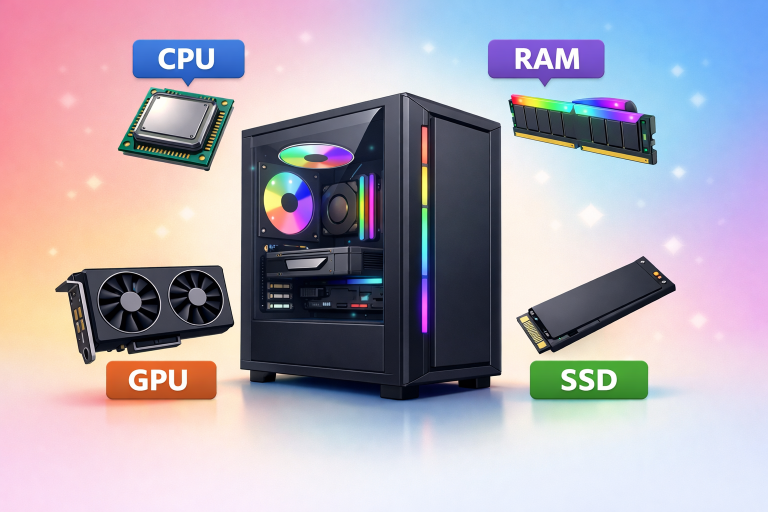
Every prebuilt computer consists of several key components that collectively determine its gaming prowess and overall longevity. Look closely at these elements before finalizing your purchase:
- Processor (CPU): A fast and reliable CPU drives not only gaming but also general system performance. Opt for current-generation chips from prominent brands with sufficient cores and threads for your workload.
- Graphics Card (GPU): The GPU is perhaps the most influential factor in gaming performance. Consult official system requirements or trusted guides to confirm a GPU’s suitability for your favorite games.
- Memory (RAM): Modern gaming systems typically require at least 16GB of RAM, with the option for more if you plan to multitask or engage in heavy content creation alongside gaming.
- Storage: Consider a primary SSD for snappy boot and load times, and, if needed, a secondary HDD for affordable bulk storage. NVMe drives offer even faster data speeds compared to SATA SSDs.
Consider Upgradeability
Convenience is a top-selling point for prebuilt systems, but it is important to look ahead. Picking a system with extra RAM slots, multiple storage bays, and a spacious case design will pay off if you want to upgrade components as technology evolves or your needs change. A system that allows easy access to internal parts makes future expansions less expensive and more approachable.
Check Warranty and Support
Prebuilt gaming PCs should come with robust manufacturer warranties and accessible customer support. Reliable warranty coverage protects against early component failure, while strong support eases troubleshooting and repair. Take time to read warranty terms and customer feedback about post-purchase service before making a decision. Brands that offer on-site assistance or carry-in service centers tend to provide faster solutions to unexpected problems.
Research Brand Reputation
The manufacturer’s reputation can say a lot about product reliability, customer support, and potential headaches after your purchase. Seek input from reputable review sources and user forums. Consistency in quality and a proven track record make certain brands more attractive, particularly when investing in high-value hardware. Additionally, look for industry awards or third-party certifications that further validate the brand’s trustworthiness.
Compare Prices and Value
With so many choices available, it is essential to compare prebuilt gaming PC models across several brands. Focus on systems within your target budget, and scrutinize each for included peripherals, game bundles, and unique selling points. Strive to balance price with the desired level of performance and support. Seasonal sales, such as Black Friday or back-to-school promotions, often bring high-end builds within reach at a price below their regular retail price.
Stay Informed About Market Trends
The gaming hardware market evolves rapidly. New generations of CPUs, GPUs, and motherboards arrive each year, and their launches often drive prices lower for older models. Following gaming news sites and subscribing to newsletters from notable manufacturers can help you spot the best opportunities. Recent trends, for instance, include deep discounts on certain high-end systems. An iBuyPower build with an AMD Ryzen 7 9800X3D CPU and NVIDIA RTX 5070 GPU, for example, was recently available at a $900 discount, a significant saving for those shopping with timing in mind. By adhering to these best practices, you can confidently choose a prebuilt gaming PC that not only fits your immediate goals but also provides flexibility, reliability, and satisfaction for many gaming sessions to come.
Conclusion
Choosing the right prebuilt gaming PC ultimately comes down to aligning performance, reliability, and long-term value with your specific needs. By clearly understanding your gaming preferences and evaluating essential components like the CPU, GPU, RAM, and storage, you can confidently narrow down your options. It is equally important to think ahead; systems that offer upgrade flexibility and strong warranty support provide better returns over time. Beyond hardware, researching brand reputation and comparing price-to-performance ratios help ensure you are making a smart, informed investment. Staying up to date on market trends and promotions can also help you secure high-quality systems at more competitive prices. In the end, a well-chosen prebuilt PC delivers not just convenience but a dependable and enjoyable gaming experience for years to come.
